Chat with any AI model.
Organize every idea.
Open Muse Chat is an AI workspace for people who use multiple LLMs. Access any model via OpenRouter, search the web, upload PDFs and images, fine‑tune model parameters, and keep everything organized with projects and branched conversations.
Bring your own OpenRouter key · Pay only for what you use
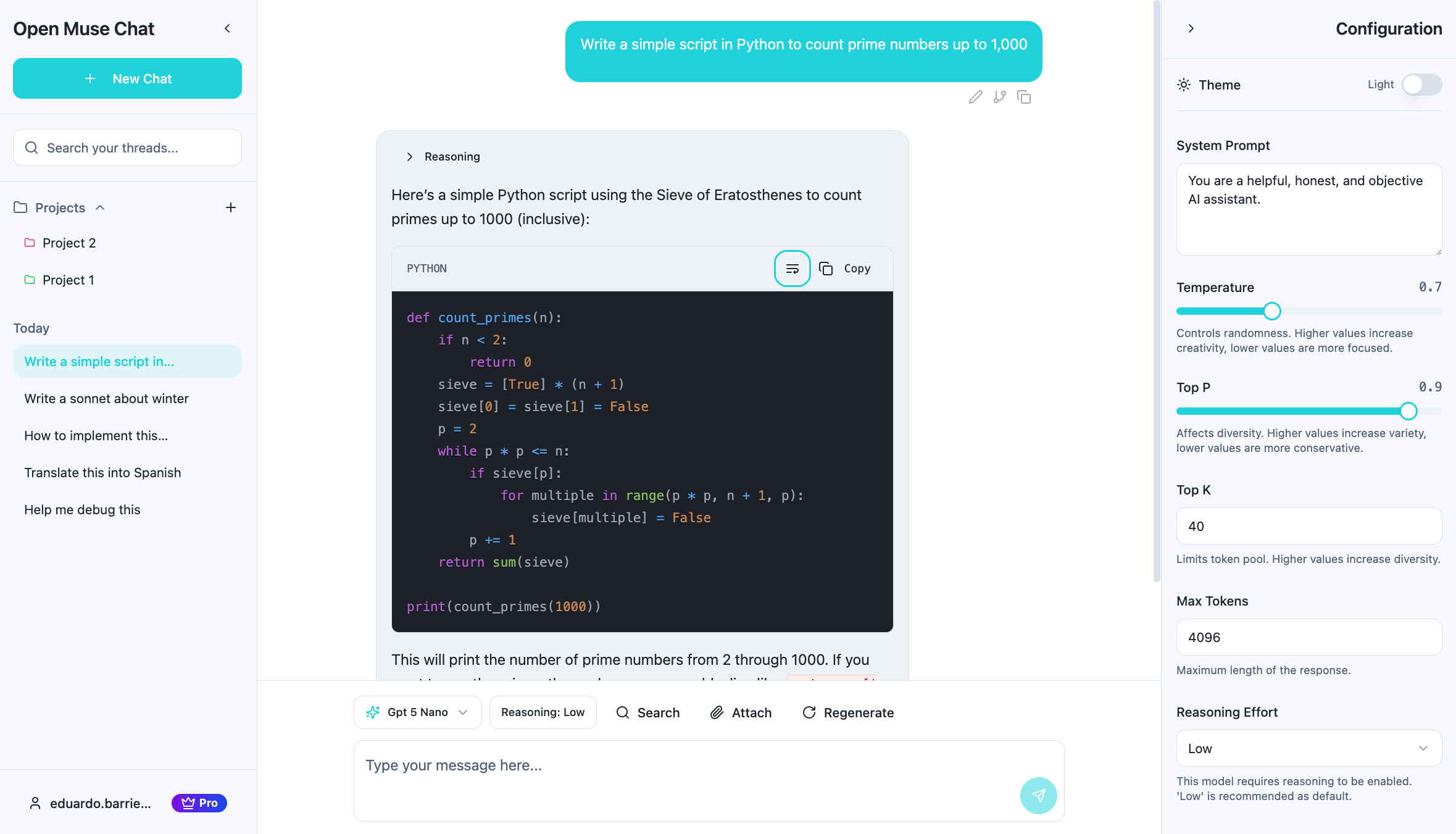
Connect to any OpenRouter model
Web search & file uploads
Fine‑grained control over model behavior
Organize chats with projects & branches
Everything you need to work with AI
Powerful features that put you in control of your AI conversations.
Any LLM via OpenRouter
Use the latest models from multiple providers in a single interface — from GPT‑5.1 and Claude to Gemini, Llama, and beyond. Switch models at any time without losing context.
Search & Knowledge Tools
Ground answers in current information with built‑in web search. Get accurate, up‑to‑date responses instead of stale training‑data guesses.
Files as Context
Upload PDFs and images so the model can read and reason over your content. Ideal for research, document review, and long‑form projects.
Advanced LLM Controls
Tune model behavior with system prompts, reasoning effort, temperature, top‑p, top‑k, and max tokens — all from a simple interface.
Projects & Branches
Group related chats into projects and branch conversations to explore different directions without losing your original thread.
Reasoning Models
Use models that think before they respond. Adjust reasoning depth and effort to balance speed, cost, and quality.
How it works
Get started in three simple steps.
Connect your OpenRouter key
Enter your OpenRouter API key to pay for inference directly. Then choose any model and configure system prompts, temperature, reasoning effort, and more.
Chat, search, and upload
Ask questions, ground them with web search, and attach files. The model responds with full context from your conversation and documents.
Organize & iterate
Save chats into projects, branch conversations to explore alternatives, and refine prompts over time to get better results.
Simple, transparent pricing
Choose the plan that works best for you.
Free
Ideal for trying out Open Muse Chat.
- Bring your own OpenRouter key
- Access to all OpenRouter available models
- Limited messages per month
- Up to two projects
- Web search integration
- Limited file uploads (PDF, images)
- Limited conversation search
Pro
For power users and professionals.
- Bring your own OpenRouter key
- Unlimited message limits
- Unlimited projects
- Unlimited file uploads
- Advanced conversation search
💡 Model inference costs (tokens) are paid directly to OpenRouter and are not included in these plans.
Pricing and features are subject to change as we learn from early users.
Frequently asked questions
Everything you need to know about Open Muse Chat.